Подскажите каким компонентом проще реализовать подобную ЦВЕТНУЮ таблицу:

Примного благодарен..
| Версия для печати темы
Нажмите сюда для просмотра этой темы в оригинальном формате |
| Форум программистов > Delphi: Общие вопросы > Подскажите компонент. |
| Автор: Mach3 2.12.2010, 11:58 |
| Привет.. Подскажите каким компонентом проще реализовать подобную ЦВЕТНУЮ таблицу: Примного благодарен.. |
| Автор: Poseidon 2.12.2010, 12:11 |
| http://forum.vingrad.ru/forum/topic-97620/hl/tvirtualstringtree/index.html |
| Автор: superVad 2.12.2010, 12:34 |
| Mach3, если тебе таблица не для работы с БД нужна то лучший вариант, что предложил Poseidon А так можно взять грид из библиотеки jvcl - он позволяет задавать цвет столбцов. Можно еще почитать это - http://www.podgoretsky.com/ftp/Language/Components/GRIDS/Kingdom/Разноцветный%20DbGrid.htm |
| Автор: remax 3.12.2010, 02:21 | ||||
Если не для работы с БД, то обычного StringGrid достаточно. Необходимо только обрабатывать его событие onDrawCell, например так:
Сорри за выбранные цвета ... |
| Автор: Mach3 3.12.2010, 17:34 |
| спасибо |
| Автор: Saboten 4.12.2010, 11:55 |
Если лень что-то прописывать в OnDrawCell, можно попробовать компонент ZColorStringGrid, наследован от TStringGrid, http://avemey.com/zcolorstringgrid/zcolorstringgrid.php?lang=ru. Умеет объединять ячейки, вертикальное/горизонтальное выравнивание и др.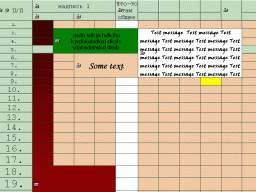 |